Android
The messenger as a single APK: download it, allow installing from an unknown source and open the file. Android 8.0 or newer.
soty-release.apk · 86 MB
DownloadInstall
The Android app is one APK, the Linux build is an unpacked archive and the relay node is a single binary. Below: what to download, what you need and what the application shows on its first run.
Builds live in the GitHub releases only, next to a SHA256SUMS file.
The latest release: the application for phone and desktop, and the relay node for operators.
The messenger as a single APK: download it, allow installing from an unknown source and open the file. Android 8.0 or newer.
soty-release.apk · 86 MB
DownloadThe same messenger for the desktop. Unpack the archive and run the soty binary; it needs GTK 3 and libsqlite3.
soty-linux-x64.tar.gz · 20 MB
DownloadAn offline delivery and tracker node: one binary that only needs libsqlite3. For operators who run a relay themselves.
dtm_host.bin · 8 MB
DownloadThe requirements are short: no account, no phone number, no email address.
The APK is about 86 MB and is installed by hand: the system asks once whether to allow installing from an unknown source.
An archive of about 20 MB. It needs the GTK 3 and libsqlite3 libraries, which a regular distribution already has.
A relay host is one binary and one database file. The smallest server is enough.
Every release ships a SHA256SUMS file: compare the download before you run it.
Pick what you are installing: the phone app, the desktop app or a relay node of your own. The steps and the screens below belong to the platform you select.
Your own relay and tracker: it holds encrypted envelopes for those who are offline and introduces devices by address. One binary and one database file.
On the releases page this is dtm_host.bin, about 8 MB. GitHub rejects the .app extension, so the file was renamed to .bin: the same bytes, the same checksum, only the name differs.
Building it yourself works too: dart compile exe bin/dtm_host.dart -o dtm_host. The suffix changes nothing — on Linux this is a plain ELF file.
An x86-64 Linux and libsqlite3 are all it takes: no separate database and no nginx while the host listens directly.
An empty output means it is missing: on Alma and RHEL run sudo dnf install -y sqlite-libs, on Debian and Ubuntu run sudo apt-get install -y libsqlite3-0.
One command brings up the relay and the tracker on port 3100: the WebSocket endpoint becomes ws://<address>:3100/ws. The log prints a banner with an invite link such as soty://host?addr=…&pk=… and the Ed25519 key of the node.
The database file is the identity of the node: the Ed25519 key is generated inside it on the first run. A new file means a new node, and clients that pinned the old key stop trusting it. So the file is copied, never deleted.
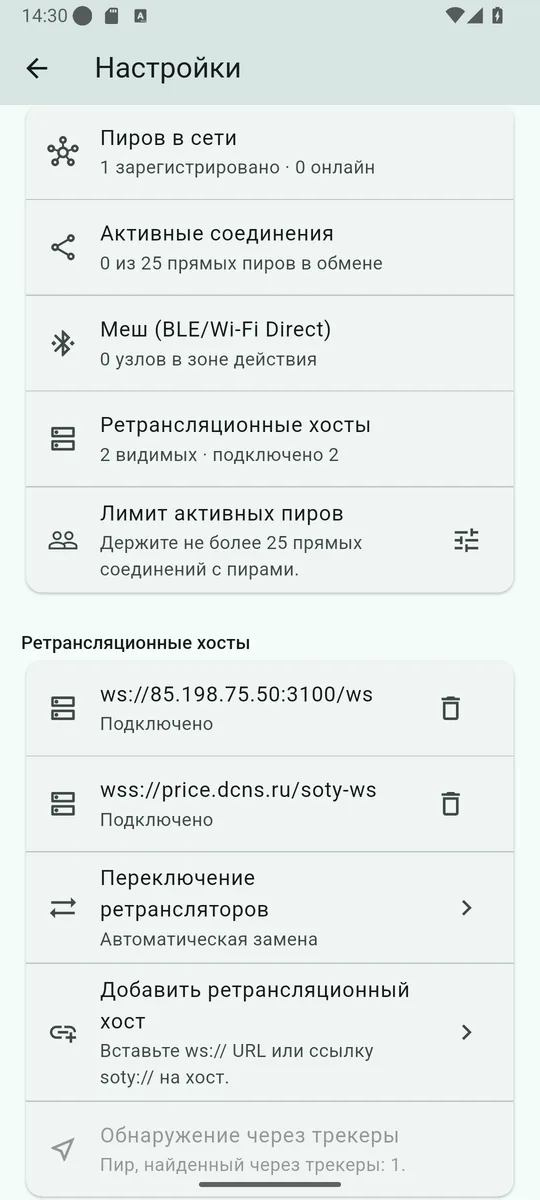
In Soty open Settings → Relay hosts → Add relay host and paste the soty://host… link from the banner, or enter the ws:// address and the key separately. The node appears in the list with a Connected status.
A terminal session is fine for a try. For permanent work the repository ships deploy/deploy-host.sh: it copies the binary, renders the configuration of the runtime you pick (systemd-user, systemd-system, supervisor, nohup), starts the service and prints the invite. Its main flags are --ssh, --runtime, --nginx, --listen, --port, --announce and --peer.
A live node and its key can be checked with the same script and the --check flag: the repository carries deploy/host_probe.py for exactly that.
Several nodes are joined with the repeatable --peer flag: they exchange envelopes while the link is up and catch up on what they missed through anti-entropy. A recipient finds the message on any node of the federation it can reach.
Every release ships a SHA256SUMS file. Download it next to the file you want and check that the bytes did not change on the way:
The same sums are printed in the release notes, so they can be compared by eye.
The places where an installation usually stumbles.
The permission is granted to one application at a time — the browser or the file manager you opened the file from. The dialog offers a shortcut to Unknown app sources; after that the installation can be repeated.
This is how the application says it did not get the camera permission. Grant it in the system settings, or add the contact as text: an invite and an X25519 key work without a camera.
Open Settings → Notifications: the application shows its own status and, when the system blocked it, offers a way into the system settings. Send test notification checks the channel at once.
That is battery optimisation at work: the system puts the app to sleep together with its mesh and relays. The settings show the current state — unrestricted or restricted by the system — while the exemption is granted in the system battery settings.
Look at Settings → Network: a node may simply have become unreachable. Add your own, or switch on Relay switching → Automatic replacement so the application uses a relay it learned from the hosts.
Nothing: the keys and the conversation live in a local database and no copy exists on a server. Once the app is gone they cannot be recovered — the project makes no backups.
From here the application needs a second participant: show the QR code or forward the invite, and the conversation can start.